Our pick for the best film RIP software for screen printing is Halftoned, for most small shops, artists and printmakers. It is a browser-based RIP with the separations built in: nothing to install, any printer that prints a PDF, and unlimited films at one flat price. A downloaded RIP that drives the printer's ink directly, like AccuRIP Emerald, FilmMaker or PrintFab, is the route for a printer that needs more ink than its own driver lays down.
This guide compares the options by what they do, where they run and how they are sold. We make Halftoned, so weigh our pick with that in mind: the reasons are listed below. Every statement about another product comes from its maker's or a reseller's own page, read on November 13, 2026 and linked in that product's section.
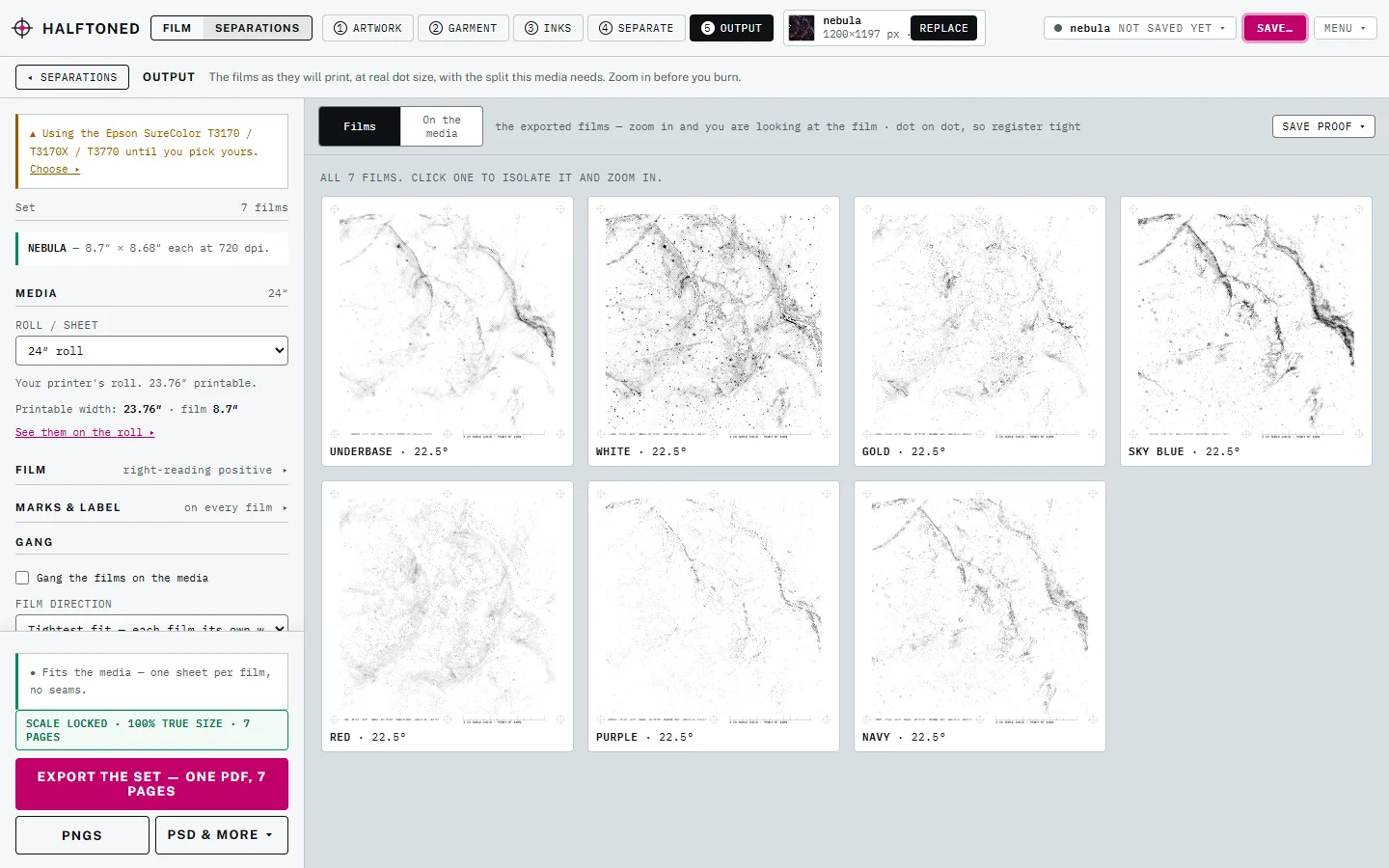
Why Halftoned is our pick
- Separations and films together. Spot color, simulated process, index and CMYK, with a choked white underbase on dark shirts, from the same tool that makes the films.
- Nothing to install. It runs in a browser tab, and you print the exact-size PDF at 100% from a Mac or Windows computer.
- It works with the printer you own. Any printer that prints a PDF, with the maker's film settings in the printer list.
- A proof with the real dots, before you burn a screen.
- Built for reorders. Your inks, printers and calibration are saved with your account.
- One flat price. $15 a month or $150 a year, unlimited films.
What a film RIP has to do
A RIP turns artwork into the black-on-clear film you burn a screen from. Whatever you use, check four things:
- True size. The film comes out at exactly the size you set, or the colors will not register.
- Halftones your mesh can hold. LPI, angle and dot shape you control, with a dot range your screens can actually burn. See LPI for your mesh.
- Density. Solid black that blocks UV light. See film positive not dark enough.
- Separations. One film per ink, with registration marks in the same place on each. Some RIPs make the separations; others only print separations you made elsewhere. See the best color separation software for that side.
The options at a glance
| Where it runs | Makes separations | How it prints | How it is sold | |
|---|---|---|---|---|
| Halftoned | Any current browser; print from Mac or Windows | Yes: spot, sim process, index, CMYK | Exact-size PDF through your printer's own driver | Monthly or yearly subscription |
| AccuRIP Emerald | Download for Mac and Windows | No, with Separation Studio NXT as a separate product | Its own print driver for certified printers | Yearly subscription |
| FilmMaker (CADlink) | Windows only, per its reseller | Process separations, per its reseller | Drives the printer's ink volume directly | Paid license, through resellers |
| PrintFab (ZEDOnet) | Windows, with a Mac version | No: monochrome only, separate in CorelDraw or Illustrator first | Raises ink volume on many Epson and Canon printers | Paid; film printing is in its Pro XL edition |
| No RIP: halftone in an image editor | Wherever your editor runs | By hand | Your printer's driver | Free if you own the editor |
Halftoned: our pick
Halftoned is a film RIP that runs in a browser tab, made for screen printers, artists and printmakers. You drop in a PNG, JPG, TIFF, SVG, PDF, Illustrator or Photoshop file, pick the shirt, and it suggests the separation: spot color, simulated process, index or CMYK, with a choked white underbase on dark shirts. The proof shows the real dots before you burn a screen, and the export is one PDF with every film at exact size and matching registration marks. You print it at 100% from the Windows or Mac computer your printer is attached to. Art Prep comes with every plan: it checks a customer's file or AI-made art against the print size, then takes out the background, enlarges a small file or redraws a logo as vector, all on your own computer.
It is built for repeat jobs too. Your inks, printers and calibration are saved with your account, so the same job prints the same way next month, and Studio + Cloud keeps named jobs on your account so they open on any computer you sign in on.
Good fit: artists and printmakers who want halftones as part of the work, and shops that want separations and films in one place without installing anything.
Keep in mind: Halftoned never talks to your printer. Density comes from the driver's own settings, so on a printer that cannot lay down enough black, a RIP that drives the ink directly will get a darker film. See can a browser film RIP print film dark enough to find out which case your printer is.
$15 a month or $150 a year, unlimited films. See the pricing or the preview.
AccuRIP Emerald
AccuRIP Emerald from Freehand Graphics is a downloaded RIP for macOS and Windows, sold as a yearly subscription with a free trial. You print from your design program to the AccuRIP print driver, then from Emerald to a certified printer. Its makers list a full-resolution preview, nesting several films on a sheet, and US-based support. Separations come from a separate product, Separation Studio NXT. Source: Freehand's AccuRIP Emerald page.
Good fit: shops with a certified printer that want a long-established, installed RIP.
FilmMaker
FilmMaker from CADlink is a RIP for dense inkjet film positives. Its reseller lists version 11, Windows only (Mac users run it in a Windows partition or virtual machine), in a desktop edition up to 24 inches wide and a wide-format edition. The listing says it can make process separations inside the program and that it raises ink density past the driver's limit. A free trial is offered. Source: a reseller's FilmMaker listing.
Good fit: Windows shops with wide-format printers that want the RIP to control ink volume.
PrintFab
PrintFab from ZEDOnet is a printer driver that works as a film RIP on many Epson and Canon inkjets, in its Pro XL edition. Its maker's page says it can multiply the ink laid down with extra passes, use UV-black or all-black ink sets, and screen at your chosen LPI and angle or with a stochastic screen. It prints monochrome art only, so color jobs are separated first in a program like CorelDraw or Illustrator. Source: ZEDOnet's screen printing page.
Good fit: one-color work, or shops that already separate in Illustrator or CorelDraw and need denser film from an Epson or Canon.
No RIP at all
You can make a halftone in an image editor (Photoshop's bitmap mode, for example), print it at 100% with color management off and density raised, and burn from that. It works for simple one-color jobs. It stops working when you need several colors in register, a white underbase, or the same result next time. See how to print film positives on an inkjet.
How to choose
- You make your own art and want to print it. Start with Halftoned. You get separations, halftones and films in one place, and nothing to install.
- You run a small shop on Mac or Windows. Halftoned is our pick; if you want an installed RIP, compare it with AccuRIP Emerald on the full cost over a year and on whether your printer is supported.
- Your printer cannot get black enough. Try the driver fixes in film positive not dark enough first. If they are not enough, a RIP that drives ink volume, such as FilmMaker or PrintFab, is the next step.
- You reprint the same jobs. Halftoned saves your inks, printers and calibration, and Studio + Cloud opens your jobs on any computer.
Still comparing? These are the nine questions worth asking of any film RIP.
Questions
What is the best film RIP software for screen printing?
For most small shops, artists and printmakers, our pick is Halftoned: a browser-based film RIP with spot color, simulated process, index and CMYK separations built in, exact-size films and nothing to install. For a printer that needs more ink than its own driver lays down, FilmMaker or PrintFab drives the ink directly.
Do I need RIP software to print film positives?
Not for a simple one-color job: a halftone from an image editor, printed at 100% with color management off, can work. A RIP earns its place when you need halftones at a set LPI and angle, several films in register, dense black and the same result every time.
Is there a film RIP for Mac?
Yes. Halftoned runs in a browser on a Mac, and AccuRIP Emerald has a macOS download. FilmMaker is Windows only, according to its reseller.
Can I make film positives without installing software?
Yes. Halftoned runs in a browser tab and exports an exact-size PDF that you print at 100% from your computer.
What is the difference between a RIP and separation software?
Separation software splits the art into one image per ink. A RIP turns each of those into a halftoned film at exact size and prints it. Some programs do one job, and some, like Halftoned, do both.