Yes, on most printers that shops use for film. A browser RIP makes the dots and the exact-size page, and your printer's own driver decides how much black ink goes down, so density comes from the driver settings and the film stock, not from where the RIP runs. On a printer that cannot lay down enough black through its driver, a RIP that drives the ink directly will get a darker film.
We make Halftoned, which is a browser RIP, so this page is about its own limit. Here is where the line is and how to find out which side of it your printer is on.
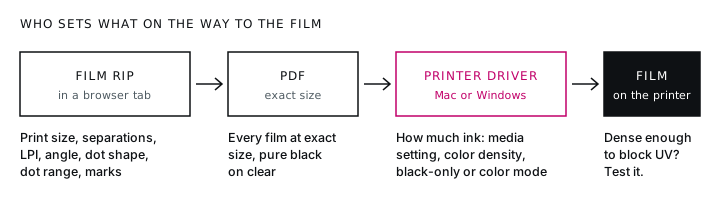
Two jobs, two places
A film positive has to be right in two ways. The dots have to be the right size in the right place, and the black has to block UV light. Different parts of the chain do each.
| What decides it | Where it is set |
|---|---|
| Print size | The RIP makes the page the exact size of the film. The driver only has to print it at 100%. |
| Halftone: LPI, angle, dot shape, dot range | The RIP |
| Separations and registration marks | The RIP |
| How much black ink goes down | The printer driver: media setting, color density, black-only or color mode |
| How much ink the film can hold | The film stock |
A browser RIP does the first three as well as an installed one. The fourth is where they differ.
Why an installed RIP can go darker
Some installed RIPs take over from the printer's driver, so they can ask for more ink than the driver allows. PrintFab's maker says it can multiply the ink laid down with extra passes and use all-black ink sets on many Epson and Canon printers. FilmMaker's reseller says it raises ink density past the driver's limit. (Both read on November 14, 2026.)
A web page cannot reach a printer's ink channels. A browser RIP hands you a file, and the black on your film is whatever the driver lays down for that file. On many printers that is plenty. On some it is not.
Get the most black out of the driver
Work through these in order. Most thin films are fixed by the first three.
- Media setting. Choose film or transparency, or the heaviest photo paper setting the driver has. This decides how much ink the printer is willing to put down.
- Color management off. You are printing black, not a photograph. Color management lightens solids.
- Color density up. This is the setting most often missed. Start from the printer maker's own film recipe if it publishes one.
- Black-only and color mode. Print the same solid bar both ways and keep whichever blocks more light. It differs by printer and ink.
- A film stock made for inkjet positives. It holds more ink than a generic transparency.
- A double strike, last. Printing the film twice adds density and costs sharpness and registration.
The full version, with Epson's published film recipes, is in film positive not dark enough.
Which printers are easy and which are hard
- Pigment printers with a film recipe from the maker are the easy case. Epson publishes film settings for the SureColor P900, P5370 and T3770.
- Photo printers with stock pigment ink are in the middle. The ink is not made for UV block, so expect to need a film media setting or a double strike.
- Dye-based printers, such as the EcoTank ET-8550, are the hard case. Dye is the hardest ink to get a solid UV block from, and shops often move to an aftermarket black ink or a double strike.
- iPads, Chromebooks and phones have no printer-driver dialog at all, so there is nowhere to raise density. Make the film on them if you like, then print the PDF from a Mac or Windows computer.
The printer list has each model's width, ink type and film recipe where the maker gives one.
Test your own printer
You do not have to guess. This takes one sheet of film and one test screen.
- Print a solid black bar at 100% with the settings above.
- Hold it to a bright light. If you can see light through the black, it is not dense enough yet. Go back up the list.
- Print the bar in black-only and in color mode, and keep the denser one.
- Burn an exposure test: the same film at several times. Pick the time where the finest dots are open and the solid is fully hardened.
If the bar blocks light and the test screen holds its fine dots, your film is dark enough. See find your printable dot range for the next step.
When to use a RIP that drives the ink
- The bar still shows light after every driver setting and a better film stock.
- You print on a dye-based printer and do not want to change its ink.
- You already own one and like its films.
You can also use both. Halftoned saves films already halftoned, as a PDF, PNG or 1-bit EPS, and separations as PSD or TIFF, so another RIP can print them. Shops that want all-black printing sometimes send the finished film through a driver-level RIP with that RIP's own halftoning turned off. We have not tested that route ourselves, so print a density bar and one film with its ruler before you trust it.
In Halftoned
The Calibration page prints the density bar and the exposure test, and saves what you find for each printer and film stock. The exposure test prints your screen two ways, with soft dot edges and as pure 1-bit, so you can see which your printer holds better and export that way from then on. The Printers page carries the maker's film recipe on the models that have one, and prints a one-page settings card to tape beside the printer. $15 a month or $150 a year, with a 30-day refund on the first payment, so you can run the test on your own printer. See the preview or the pricing.
Questions
Does a browser RIP control ink density?
No. A browser RIP makes the halftone and an exact-size file. The printer's driver controls how much ink is laid down: the media setting, the color density and the ink mode.
Do I need all-black ink to print film positives?
Not always. On pigment printers, the printer's own black with color management off and density raised often blocks UV. Dye-based printers are harder and may need an aftermarket black ink or a double strike. A solid bar held to a light tells you.
Can I print film positives from an iPad or Chromebook?
You can make the film there, but print it from a Mac or Windows computer. iPads and Chromebooks print without a printer-driver dialog, so there is no way to turn color management off or raise density, and films usually come out thin.
Is a film from a browser RIP as sharp as one from an installed RIP?
The dots are drawn at the film's own resolution, from 360 to 2880 dpi, before the file reaches the printer. In Halftoned the exposure test prints the same screen with soft dot edges and as pure 1-bit, and you keep whichever your screens hold better.