Our pick for the best color separation software for screen printing is Halftoned, for most artists, printmakers and small shops. It is browser-based and all-in-one: it separates, halftones, proofs and outputs the films from one place, with a film RIP built in and no Photoshop to buy. If you already work in Photoshop, a plug-in like T-Seps or UltraSeps is the other good route, and if you already print through AccuRIP, Separation Studio NXT fits beside it.
This guide compares the options by what they separate, what they need, and how the films get printed. We make Halftoned, so weigh our pick with that in mind: the reasons are listed below. Every statement about another product comes from its maker's own page, read on November 13, 2026 and linked in that product's section.
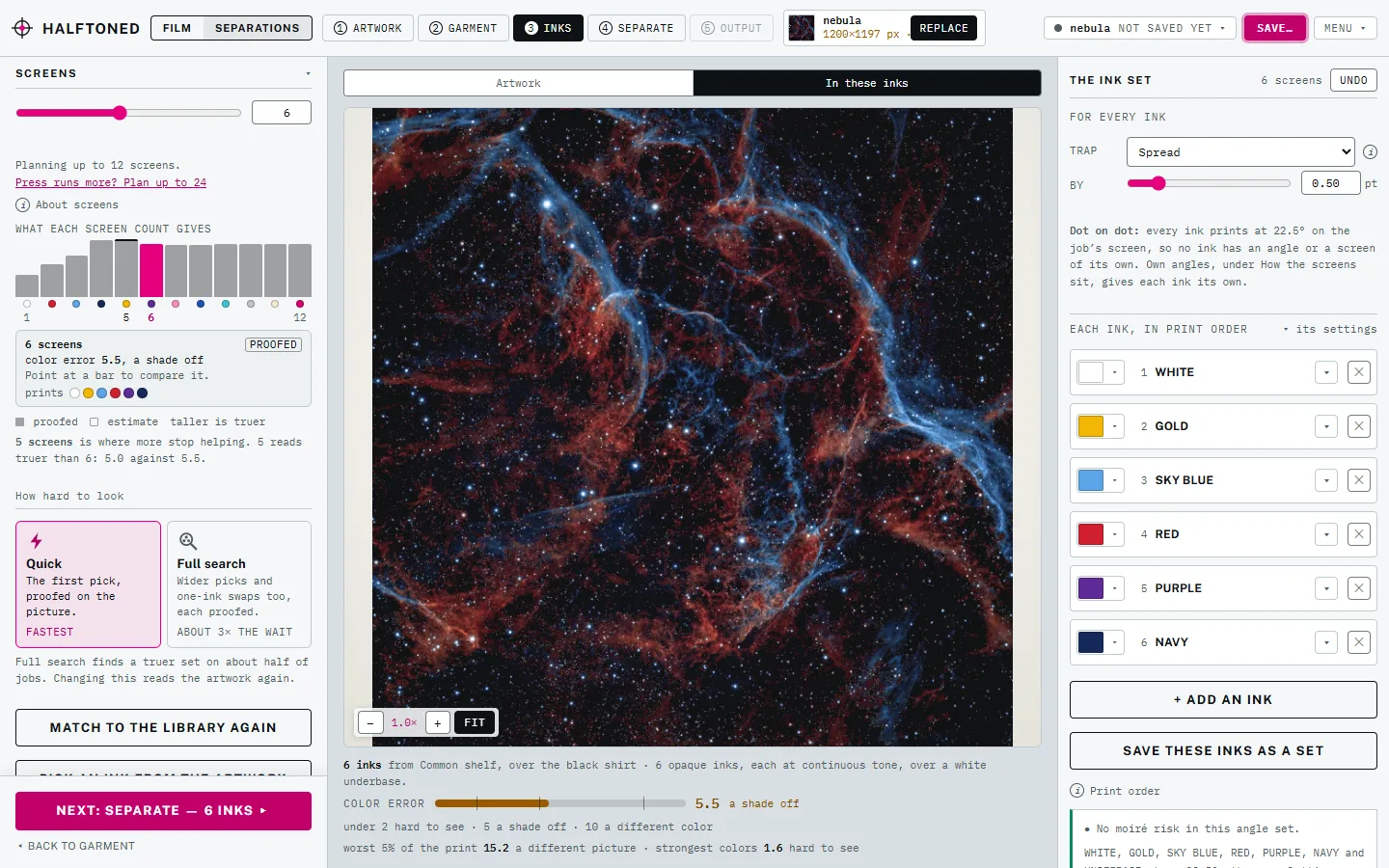
Why Halftoned is our pick
- All four methods in one place. Spot color, simulated process, index and CMYK, with the method suggested from the art and the shirt.
- The underbase is handled. It is built from the art and choked for you on dark shirts.
- You see the print before you burn. The proof shows the real halftone dots over the shirt color.
- The films come from the same tool. One exact-size PDF, every film with matching registration marks, and no separate RIP.
- Nothing to install. It runs in a browser, on Mac or Windows.
- One flat price. $15 a month or $150 a year, every method included, unlimited films.
What good separations deliver
Whatever makes them, finished separations have to give you:
- The right method for the art and the shirt. Spot color for flat art, simulated process or index for photos on dark shirts, CMYK for photos on white. See which separation to use.
- A white underbase that is choked, so it does not peek out around the colors on a dark shirt. See white underbase for dark shirts.
- Halftones your mesh can hold, at an LPI and angle that do not moiré. See halftone angles and moiré.
- Films at exact size, in register, one per ink. See what a finished separation needs.
The options at a glance
| Needs | Separations | Films | |
|---|---|---|---|
| Halftoned | A current browser | Spot, sim process, index, CMYK, choked white underbase | Exact-size PDF from the same tool |
| Separation Studio NXT | Windows 10+ or Mac High Sierra+ | Sim process from raster art, spot color from vector PDF or AI | Through AccuRIP or another RIP |
| T-Seps 4.0 | Adobe Photoshop (English, CC) | Spot, sim process, index, CMYK, monochrome | Its own halftone routine, or any RIP |
| UltraSeps v3 | Adobe Photoshop (English, CS3 to CC) | Index, sim process, spot color | Its own halftone functions, or a RIP |
| By hand | Photoshop, Illustrator or similar | Whatever you build | Through a RIP or your printer's driver |
Halftoned: our pick
Halftoned is a film RIP and separation tool that runs in a browser tab, made for screen printers, artists and printmakers. Drop in a PNG, JPG, TIFF, SVG, PDF, Illustrator or Photoshop file and pick the shirt, and it suggests the method: spot color for flat art, CMYK for a photo on a white shirt, simulated process for a photo on a dark one. You can switch methods in one click and compare. The white underbase is choked for you, the proof shows the real dots over the shirt, and the films come out of the same tool at exact size. It also opens separations you already have, as a PSD or TIFF with spot channels, per-plate files or a separations PDF. Art Prep comes with every plan: it checks a customer's file or AI-made art against the print size, then takes out the background, enlarges a small file or redraws a logo as vector, all on your own computer.
For shops that reprint, your ink library, printers and calibration are saved with your account, and Studio + Cloud keeps named jobs on your account so they open on any computer.
Good fit: artists who want their own work printed the way they see it, and shops that want separations and films without Photoshop or a second program.
$15 a month or $150 a year, every method included. See the pricing or the preview.
Separation Studio NXT
Separation Studio NXT from Freehand Graphics is a separation program for Windows and Mac, sold as a yearly subscription with a free trial. Its maker says it makes simulated process separations from raster art (TIFF, PNG, JPG) and spot color separations from vector PDF or AI files, with one-click underbase, choke and spread, ink and textile libraries, and a tool to cut a sim process job down to six colors or fewer. It prints through AccuRIP or any RIP with a hot folder, and can save separations with press marks. Source: Freehand's Separation Studio NXT page.
Good fit: shops already printing through AccuRIP or another installed RIP.
T-Seps
T-Seps 4.0 from T-Biz Network is an automated separation plug-in for Adobe Photoshop. Its maker lists spot color, simulated process, index, CMYK and black and white separations, with underbase and highlight white. It needs an English version of Photoshop CC and runs on Windows and Mac, including Apple Silicon. It can turn separations into halftones ready to print without a RIP, or work with a RIP. A 20-day trial is offered. Source: T-Biz Network's T-Seps pages.
Good fit: artists and shops who already work in Photoshop and want automated routines inside it.
UltraSeps
UltraSeps v3 is a separation plug-in and action set for Adobe Photoshop, from CS3 through current Creative Cloud, with Windows and Mac installers. Its pages describe index, simulated process and spot color separations, and functions that turn separations into halftones inside Photoshop when you have no RIP. It needs an English version of Photoshop. The 15-day trial is the earlier version 2, which its maker says does not run on recent macOS. Source: the UltraSeps v3 page.
Good fit: Photoshop users on Windows, or on a Mac with the full version.
Separating by hand
You can separate in Photoshop or Illustrator yourself: a layer or channel per ink, an underbase built from the art and choked, halftones at a set LPI and angle, and registration marks on every film. It costs nothing extra if you own the program, and it teaches you what every tool above is doing. It takes the longest, and it is the hardest to repeat exactly on the next job.
How to choose
- You make the art and want to print it yourself. Halftoned gets you from file to films in one place, with the proof in front of you.
- You live in Photoshop. A plug-in like T-Seps or UltraSeps keeps you there; budget for Photoshop and a way to print films.
- You already run an installed RIP. Separation Studio NXT is built to print through it.
- You reprint the same designs. Halftoned saves your inks and printer settings, and Studio + Cloud reopens your jobs on any computer.
Choosing how to print the films too? See the best film RIP software.
Questions
What is the best color separation software for screen printing?
For most artists, printmakers and small shops, our pick is Halftoned: it is browser-based, makes spot color, simulated process, index and CMYK separations, chokes the white underbase, and outputs the films itself. Photoshop users often choose T-Seps or UltraSeps, and shops that print through AccuRIP often choose Separation Studio NXT.
Can I make color separations without Photoshop?
Yes. Halftoned runs in a browser and separates spot color, simulated process, index and CMYK, then exports the films. Separation Studio NXT is also its own program, with its own workspace, though it is built to sit alongside Adobe and Corel tools.
What separation should I use for a photo on a black shirt?
Simulated process or index, with a white underbase. Simulated process gives smoother tones; index uses same-size square dots with no angles, so it does not moiré. See index color separations.
Do I need a RIP as well as separation software?
You need something that turns each separation into a halftoned film at exact size. Halftoned does both. Photoshop plug-ins can halftone inside Photoshop, and installed programs like Separation Studio NXT print through a RIP.
How many screens does a simulated process job need?
It depends on the art: a white underbase, the main colors of the image, and often a highlight white. Many jobs land between six and ten. Fewer inks fit a smaller press; more give smoother color but take more screens and press time.